WhatsApp CRM in Kenya: How Businesses Automate Enquiries, Leads and Follow-ups
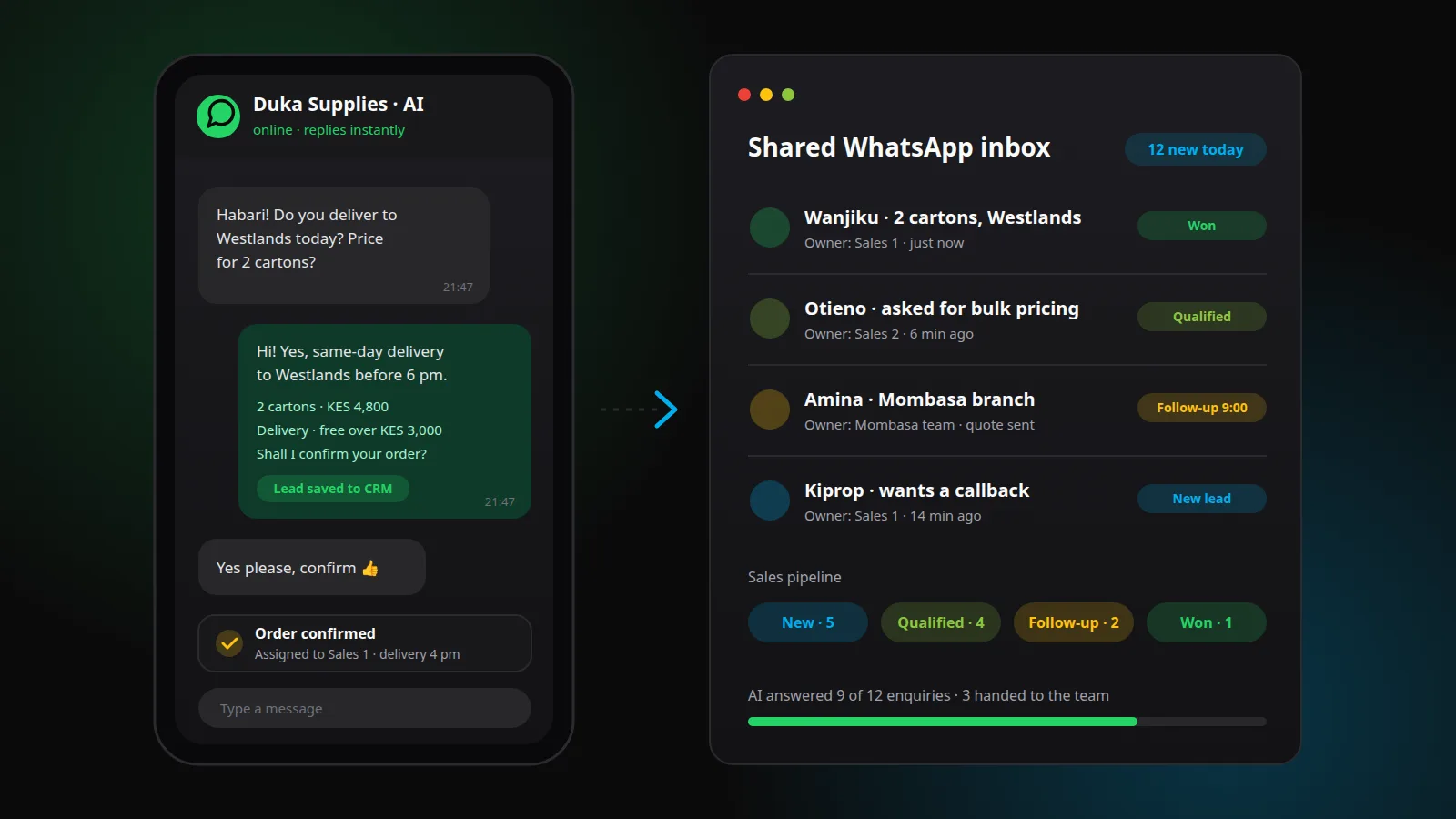
In Kenya, customers ask about prices, stock and delivery on WhatsApp long before they visit a shop or website. A WhatsApp CRM turns those chats into a sales system: every enquiry lands in one shared inbox, gets an owner and a follow-up date, and common questions are answered automatically by AI. The whole sale, from the first “how much?” to the order confirmation, can happen in one conversation.
This guide explains what a WhatsApp CRM is, when a Kenyan business has outgrown the free WhatsApp Business app, what you can safely automate, how to set it up, and what to check under the Data Protection Act before you start.
What is a WhatsApp CRM?
A WhatsApp CRM (customer relationship management system) organises your WhatsApp conversations like customer records. For every chat you can see who the customer is, what they want, who on your team is handling it and what should happen next.
It runs on the official WhatsApp Business API rather than on one person’s phone, so the whole team can work from a single business number. On top of the shared inbox, most WhatsApp CRMs add a sales pipeline, automatic replies, question flows that collect a customer’s details, broadcast campaigns and reports.
Signs your business has outgrown the WhatsApp Business app
The free WhatsApp Business app works well for a single owner. It starts to hold a business back when:
- Enquiries sit on one phone. If the person with the phone is off, busy or leaves the company, customers wait or are lost.
- Nobody knows who replied. Several staff share the number, two people answer the same customer, or nobody does.
- Follow-ups depend on memory. Customers who said “let me think about it” never hear from you again.
- The same questions take hours every day. Prices, opening hours, delivery areas in Nairobi or Mombasa, payment options.
- You cannot measure anything. You do not know how many enquiries came in this week, how fast you replied or how many became sales.
WhatsApp Business app vs a WhatsApp CRM
| WhatsApp Business app | WhatsApp CRM on the Business API | |
|---|---|---|
| Team access | One phone plus a few linked devices | A shared inbox for the whole team on one number |
| Ownership | No chat assignment | Every chat has an owner and internal notes |
| Lead tracking | Labels only | Pipeline stages and follow-up dates |
| Repeat questions | Quick replies typed by staff | AI replies from your own knowledge base |
| Order updates | Typed and sent by hand | Confirmations and reminders sent automatically from approved templates |
| Reporting | Basic message statistics | Enquiries, response times and sales by stage and by staff member |
What can you automate with AI on WhatsApp?
The aim is to let the system handle the repetitive work so your team spends its time on customers who are ready to buy. Good starting points are:
- Instant first replies, day or night, so no enquiry waits until the office opens.
- Answers to common questions from a knowledge base you control: prices, stock, delivery areas and charges, opening hours, returns.
- Lead qualification. A short question flow asks what the customer needs, how many and by when, and saves the answers on the chat record before anyone replies.
- Routing. Sales enquiries go to sales, support questions go to support, and a Mombasa customer goes to the Mombasa branch.
- Follow-up reminders for leads that went quiet, and appointment or delivery reminders for confirmed orders.
- English and Kiswahili. Modern AI models handle both, including messages that mix the two. Test the replies on real customer questions first.
Keep a person in charge of anything that commits your business: custom prices, refunds, complaints and anything the AI is unsure about. A good setup hands those chats to a team member with the full history attached. For more on how this kind of assistant works, see what an AI agent is and where it helps.
How a WhatsApp enquiry becomes a sale
With a WhatsApp CRM, every enquiry follows the same path, so nothing depends on one person’s phone or memory:
- The customer messages your business number. The chat lands in the shared inbox and gets an instant first reply.
- A short question flow collects the details: what they want, how many, where and by when. The AI answers anything else from your knowledge base.
- The chat is assigned to the right person or branch, with the customer’s answers already on the record.
- The lead moves through your pipeline with a follow-up date, so customers who are still deciding hear from you again.
- The order is confirmed in the chat, and confirmations, delivery updates and reminders go out automatically.
Order details can also be passed to your invoicing or ERP system, so nobody has to retype them.
Staying within the Data Protection Act and Meta’s rules
A WhatsApp CRM stores customers’ names, numbers and conversations, so it handles personal data. Under Kenya’s Data Protection Act 2019 and the guidance of the Office of the Data Protection Commissioner (ODPC), good practice includes:
- Consent for marketing. Send broadcasts and promotions only to customers who have agreed to receive them, and record when and how they agreed.
- An easy opt-out. Customers must be able to stop marketing messages simply, and you must respect it.
- Access control. Staff see only the chats they need, and every action is logged.
- Export and delete on request. You should be able to give a customer their data or remove it.
Meta has its own WhatsApp Business messaging policy: business-started messages outside an open conversation must use approved templates, and accounts that spam customers can be restricted. This article is general guidance, not legal advice. Check your specific use with a lawyer.
How to set up a WhatsApp CRM, step by step
- Choose the number. Decide which business number customers will use. Moving a number from the WhatsApp Business app to the API is possible, but plan the switch.
- Verify your business with Meta and connect the number to the WhatsApp Business API through your CRM provider.
- Map how you sell today. Write down your pipeline stages, who handles which enquiries and the questions your team asks every customer.
- Build the knowledge base for AI replies: prices, policies, delivery areas and the answers your best salesperson gives.
- Set up question flows and routing, then connect your order, invoicing or booking system if you need it.
- Get message templates approved for follow-ups, reminders and receipts.
- Go live with your team, review the AI’s replies daily for the first weeks, and improve the knowledge base from real chats.
What does a WhatsApp CRM cost?
Budget for two things. The first is the CRM plan, usually priced by the number of team members and features. The second is Meta’s charges for template messages sent through the WhatsApp Business API, which Meta sets by country and message type and can change. Replies inside a conversation the customer started are treated differently from messages your business starts, so a business that mostly answers incoming enquiries pays less in Meta charges than one that sends large broadcasts. Integrations with your other systems, such as an ERP or booking system, are usually a one-off setup cost.
Trixloop: an AI WhatsApp CRM for Kenyan businesses
Trixloop is Techrish’s WhatsApp AI automation CRM, built on the official WhatsApp Business API. It gives your team a shared inbox on one number, an owner and internal notes for every chat, a sales pipeline with follow-up dates, lead flows that collect customer details before anyone replies, AI auto-replies from your own knowledge base, and broadcast and drip campaigns for customers who have opted in.
For Kenyan businesses, Techrish also builds the connections around it: links to your ERP, accounting or KRA eTIMS invoicing, and assistants set up in English and Kiswahili. It suits shops and retailers, sales teams, clinics, schools, property agents and service businesses, and safari and tour operators. If you run a safari company, read our guide to safari booking systems in Kenya. See everything we build for Kenyan businesses on our AI development company in Kenya page.



 WhatsApp