Magento B2B Migration

When Should You Consider Migrating from Magento to a B2B eCommerce Platform?

If your team keeps working around Magento to manage account pricing, integrations and approvals, and everyday operations become increasingly difficult, it may be time to consider a change.

Here is how to tell, and what to do about it.

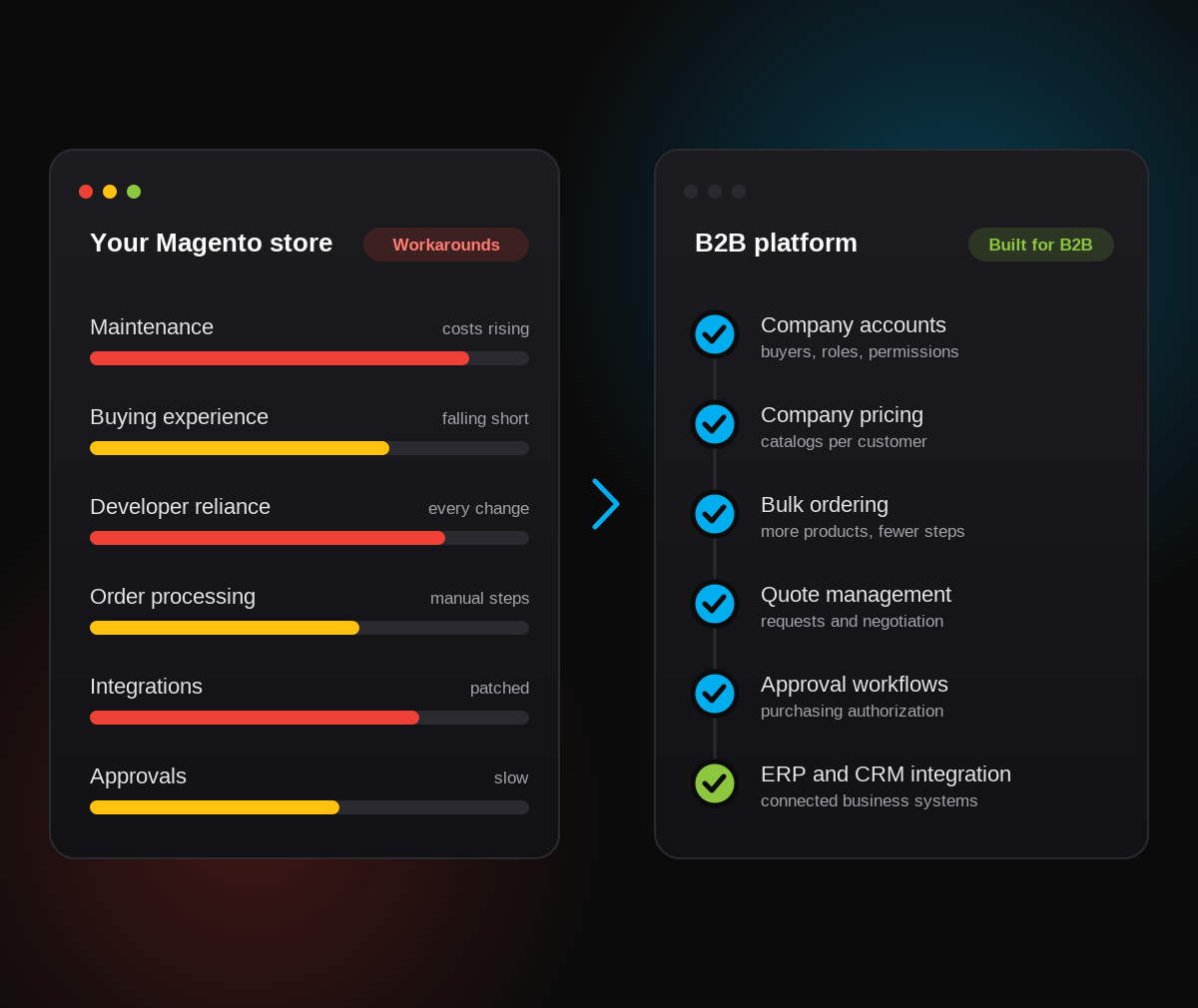
A Magento store held together with workarounds on the left, and a B2B eCommerce platform with company accounts, pricing, bulk ordering, quotes, approvals and ERP and CRM integration on the right

Last updated:

The signs

Six Signs Your Magento Store No Longer Fits B2B Selling

01

Cost

Increasing Maintenance and Development Costs

Frequent updates, custom development, extension compatibility issues and ongoing technical support can make your Magento store expensive to maintain. If routine changes require significant development efforts, a different platform may help to reduce the operations burden.

02

Experience

Your B2B Buying Experience Is Falling Short

Expanding product catalogs, entering new markets, accommodating more customers and supporting higher order volumes can put additional pressure on your existing systems. Your platform should support growth without making every change a complex project.

03

Team

Your Team Depends Too Much On Developers

If updating content, changing product information or managing promotions require frequent developer involvement, your team may lack the flexibility it needs to respond to business demands.

04

Orders

Manual Order Processing

Bulk orders, repeat purchases and quote requests still involve too many steps. Without streamlined ordering workflows, your team spends more time handling orders and less time serving customers.

05

Integrations

Integration Challenges

Connecting your ERP, CRM and other business systems requires ongoing fixes and workarounds. Disconnected systems lead to data inconsistencies, delays and extra manual work.

06

Approvals

Slow Approval Workflows

Purchase approvals, quote approvals and order processes take longer than they should. Without flexible approval workflows, even routine transactions can get delayed.

B2B capabilities

What Can a Dedicated B2B eCommerce Platform Offer?

A platform designed around B2B purchasing requirements may provide better alignment between your digital storefront and business operations. Depending on the platform, relevant capabilities may include:

Worth checking first: the actual capabilities vary by platform, edition and configuration. These requirements should be evaluated before choosing a replacement for Magento.

Before you decide

Key Considerations Before You Migrate

Migrating your eCommerce store is more than moving products and customer data. It requires understanding how your business operates and ensuring the new platform supports your essential workflows.

01

B2B Features and Buying Requirements

Evaluate whether the new platform supports your customer-specific pricing, company accounts, purchasing roles, bulk ordering, quotation workflows, approval processes and repeat orders. Identify which capabilities are available natively and which may require customization or integration.

02

Product, Customer and Order Data

Plan how products, categories, customer accounts, pricing, order history and other important data will be transferred. Data mapping and validation are essential to avoid inconsistencies after migration.

03

Integrations and Business Systems

Review your existing ERP, CRM, inventory, payment, shipping and other integrations. Confirm how these systems will connect to the new platform and whether any existing workflows need to change.

04

SEO and Existing Traffic

Your current Magento store may have valuable organic traffic and search rankings. Plan URL redirects, metadata migration, canonical tags, internal links, structured data and sitemap updates to reduce the risk of losing search visibility.

05

Total Cost and Long-Term Maintenance

Compare platform costs, development requirements, integration expenses, hosting, support and ongoing maintenance. The right platform should fit your operational needs and long-term business plans, not just your initial migration budget.

How to migrate

Steps to Migrate from Magento to a B2B eCommerce Platform

Migrating from Magento requires proper planning to avoid data loss, business disruptions and SEO issues. Follow these key steps for a smoother transition.

Evaluate Your Existing Magento Store

Review your current store, custom features, integrations and B2B requirements. Identify what needs to be retained, improved or removed.

Choose the Right B2B Platform

Compare platforms based on pricing, customer management, bulk ordering, integrations and scalability. Choose one that fits your business operations.

Plan Your Data Migration

Identify the data that needs to be transferred, including products, customer accounts, pricing rules, order history and product categories.

Rebuild Essential Features and Integrations

Configure important B2B functionalities and reconnect systems such as ERP, CRM, inventory and payment solutions.

Test Before Going Live

Check product information, customer accounts, pricing, checkout, integrations and mobile experience to identify issues before launch.

Launch and Monitor Performance

After migration, monitor website functionality, order processing, customer activity and search performance. Fix any issues that arise after launch.

Migration risks

Common Magento Migration Challenges and How to Handle Them

Moving to another B2B eCommerce platform can involve technical and operational challenges. Identifying them early helps reduce migration risks.

01

Data Loss or Inconsistency

Product details, customer records and order information may not transfer correctly during migration. Clean your existing data, create backups and verify migrated records before launching the new store.

02

SEO Ranking Drops

Changes to URLs, page structures and metadata can affect your website’s search visibility. Plan URL mapping, set up relevant 301 redirects and preserve important SEO elements during migration.

03

Integration Issues

Existing ERP, CRM and inventory systems may not connect properly with the new platform. Review integration requirements early and test data exchange between systems before going live.

04

Loss of Custom Functionality

Some Magento extensions and custom features may not be available on your new platform. Identify essential features in advance and plan suitable alternatives or custom development where needed.

05

Business Disruption During Migration

Migration issues can affect order processing, customer access and daily operations. Plan the transition carefully, test the new store and schedule the launch to minimize business disruption.

06

Unexpected Migration Costs

Data cleanup, custom development and third-party integrations can increase migration expenses. Define the project scope early and consider development, testing and ongoing maintenance costs when preparing your budget.

FAQ

Frequently Asked Questions

Upgrading is often the practical choice if your existing Magento architecture is stable, your team relies on deep custom code that already fits your workflows, and your main goal is staying on a supported release. Migration becomes more attractive when upgrades are costly or your B2B needs are poorly served by your current setup.

Timelines vary based on catalog size, custom B2B workflows, data cleanup needs, and the number of ERP or third-party integrations. Simple builds take less time, while multi-warehouse or deeply integrated B2B operations require longer discovery, testing, and phased rollout.

Customer-specific pricing, company account structures, user permissions, and historical order records usually require the most care. Field formats rarely match one-to-one between platforms, so mapping and test imports are essential.

You can protect existing search equity by auditing current URLs, implementing accurate redirects, keeping key metadata intact, and monitoring indexing after launch. Poor redirect planning or accidental blocking of pages is a common cause of post-launch traffic drops.

Look at how often extensions conflict during updates, how many workarounds your team uses, and which plugins exist only to patch missing B2B features. Consolidating overlapping tools often simplifies maintenance.

Techrish T mark

Magento B2B Migration

Is Your Magento Store Ready for a Change?

If Magento is limiting your B2B operations, increasing maintenance efforts, or making integrations difficult, it may be time to consider a change. Looking to migrate? Contact Techrish to discuss your eCommerce requirements.